Grogu or Yoda?
Day one: Grogu smashing buttons. Day one thousand: Yoda explaining why the button matters.
What is a RAM?
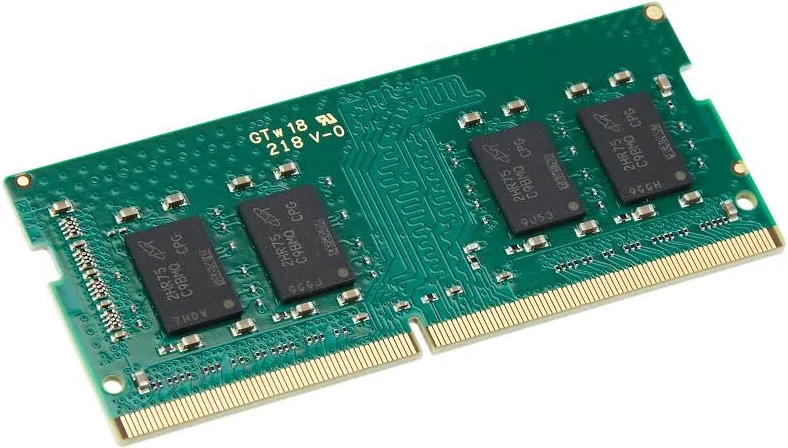
Figure 1: Crucial 8GB 2400MHz DDR4 SODIMM Laptop Memory
RAM (for Random Access Memory) is used to store data structure during runtime data. Figure 1 shows the image of how RAM looks like. Runtime data is the data stored in RAM which is required to run functionality of the computers (more like doing computation in ALU - Arithmetic Logical Unit, and CPU’s). For example, Your image is in storage-data (like Hard-disk, SSD), but when you double click on the image, it loads the storage-data into runtime memory (like RAM) which allows us to see the image on screen after its processed.
So what is a Data Structure?
In simple words, Its structuring of data in temporary storage (e.g. RAM - Runtime Storage) or permanent storage (e.g. Solid State Drive) to access it with ease. For example, when you want to store an integer in your storage you can’t allocate the space required for a character, or float or image to be stored and vice versa. You require a specific amount of bits and specific amount of structuring of those bits to get your integer stored in your computer for further use. Think of it like, you can’t use rat trap to capture elephant. You need bigger and specific trap. The same way you need to allocate space in RAM for integers, character, floats, gender data, food list, etc..
Examples of Data Structures:
| Data Structure | Values Stored |
|---|---|
| integer (int) | …, -3, -2, -1, 0, 1, 2, 3, … |
| float | -3.14, -1.0, 0.5, 1.5, 100.984 |
| character (char) | a, A, b, c, …, $, #, ₹, (, ), … |
| Gender | Male, Female |
- Integer, Float, Character are
primitivedata structures meaning they built-in by developers of the language for us. - Gender, on the other hand, is a
User-Defineddata structure which is built by us usingprimitivedata structures for storing a gender related data for a ease of use.
Size of a typical RAM?
It is very common for RAM to come in 4 GB, 8 GB, 12 GB, 16 GB, 32 GB, 64 GB, …
So what is GB in 8 GB of RAM?
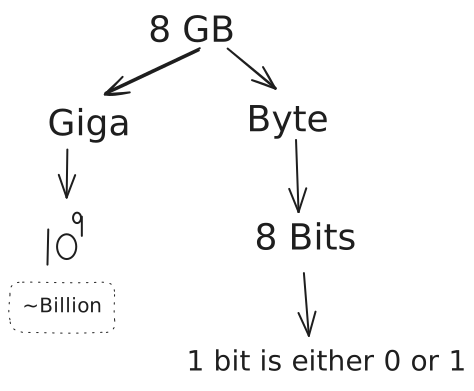
8 GB is approximately a 8,589,934,592 bytes, which is 68,719,476,736 bits and each bit stores either 0 or 1.
Fun Fact
1 bit = 1 transistor; meaning there are 64 Billion to 70 Billion transistors in an 8GB RAM. Nowadays, transistors are very small with size around 10nm to 20nm. (nm is nanometer, which is 1 meter = 1e+9 nm or 1nm is one billionth of a meter)
This is image of a NPN transistor. to learn more on how a transistor works, refer to this video: How a transistor works
Reality of 0’s and 1’s: The language of computer?
- A bit is either
0or1is an abstract form. Under the hood, itstransistorsthat stores data in the form ofvoltage. - In Reality:
0means low voltage.1means high voltage.
- Computer works with low and high voltages. (there is a constant flow of voltage in transistors).
Storing an Integer {1, 7} in Computers:
Note: Integers use 4 bytes (which is 4 x 8 = 32 bits).
Storing 1

Storing 7

What is happening?
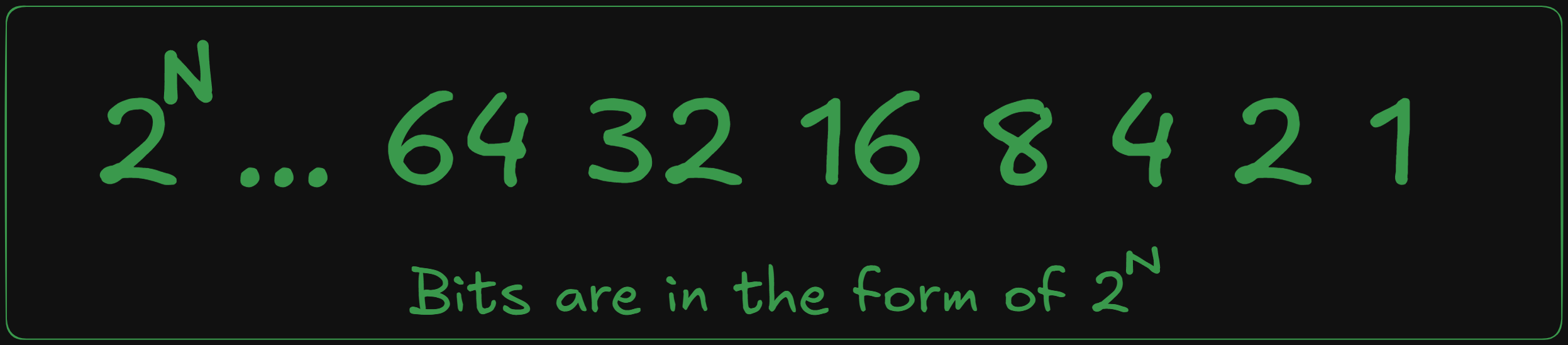
Bits are stored in group of 8 bits.
- bits are in the form of
- Power of 2’s with maximum value can be:
- For Example:
- 1: x 1 + ( x 0 + x 0 + … rest 29 bits are 0) = 1.
- 7: x 1 + x 1 + x 1 + ( x 0 + x 0 + … rest 27 bits are 0) = 7
What is Array?
Array is a contiguous block of data.
How arrays are stored in RAM?
Note: one of the RAMs functionality is to allocate space for our computational work. RAM can allocate memory or space randomly anywhere within it.
- Most Integers are stored as
bytes of 4. Therefore, when parsing an array of integer, we add+4in to get another integer in the array (stored in RAM).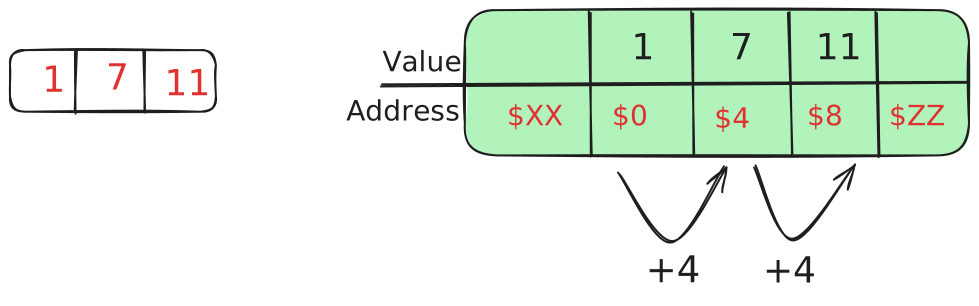
- Most ASCII characters are stored as
1 byte. Therefore, when parsing an ASCII character in array, we add+1after first character to get another character.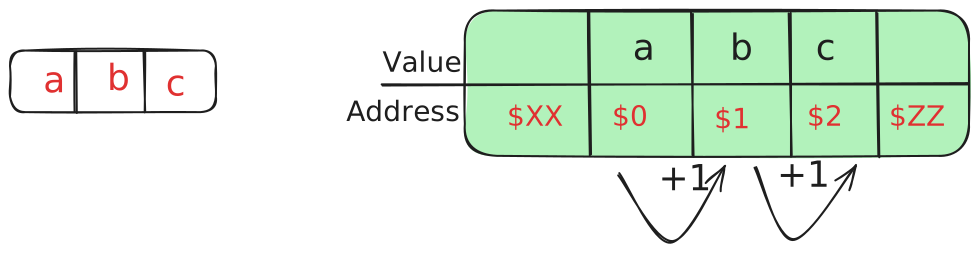 Maybe, It can be overwhelming at first, but its very simple.
Moving on, lets look at bit manipulation and operations.
Bit Logical” Operations
- Manipulating the bits
- Bits are either
0or1. - Just like logic:
- Cake
orSandwich - Games
andStudy nothappynotGamesandStudy
- Cake
- We can use the same logic for our bits.
- 1 is
True, 0 isFalse. - Note: In computers, anything except 0 is True. Meaning 0 is False, 1, 2, 3, 4, 5, 6, -1, -2, -3, … is True.
AND
- denoted with
&in many programming languages. - 1 & 1 = 1
| IN 1 | Operation | IN 2 | OUT |
|---|---|---|---|
| 0 | & | 0 | 0 |
| 0 | & | 1 | 0 |
| 1 | & | 0 | 0 |
| 1 | & | 1 | 1 |
OR
- denoted with
|in many programming languages. - 1 | 0 = 1
| IN 1 | Operation | IN 2 | OUT |
|---|---|---|---|
| 0 | | | 0 | 0 |
| 0 | | | 1 | 1 |
| 1 | | | 0 | 1 |
| 1 | | | 1 | 1 |
XOR
- denoted with
^in many programming languages. - 0 ^ 1 = 1
| IN 1 | Operation | IN 2 | OUT |
|---|---|---|---|
| 0 | ^ | 0 | 0 |
| 0 | ^ | 1 | 1 |
| 1 | ^ | 0 | 1 |
| 1 | ^ | 1 | 0 |
NOT (also called negation)
- denoted with
~in many programming languages. Sometimes!is also used to represent negation. - ~1 = 0
| IN | Operation | OUT |
|---|---|---|
| 0 | ~ | 1 |
| 1 | ~ | 0 |
Bit Shifting Operation
- Computer widely uses bit shifting for:
- Performance Optimizations like multiplication/division by powers of two into shifts for speed.
- Low-level programming of computers which directly manipulates bits give better performance.
- Two bit shifting operations:
>>(Right shift): Shift the bit to the right, add 0 from the left and discard the rightmost bit.<<(Left shift): Shift the bit to the left, add 0 from the right and discard the leftmost bit.
- Example: N = 11
(1011)
| Operations | Method | Output |
|---|---|---|
| Load | 1011 | 1011 |
| >> | 1011 >> 1 | 0101 |
| << | 0101 << 1 | 1010 |
| >> | 1010 >> 1 | 0101 |
| >> | 0101 >> 1 | 0010 |
| >> | 0010 >> 1 | 0001 |
| >> | 0001 >> 1 | 0000 |
This is bit shifting, again it can be overwhelming.
This is all about RAM and Bits. Below is Coding Problems to solve:
Coding Arena
Solve the problems. If stuck use the solution link to pull yourself towards the right path, but don’t push yourself. Remember to give yourself break and come back to think on the problem in different way.
- LeetCode - 191. Number of 1 Bits - Solution
- LeetCode - 338. Counting Bits - Solution
- LeetCode - 190. Reverse Bits - Solution
Supplementary Resources
You can read more about how a computer works under the hood in your free time with below resources:
- NAND2TETRIS
- Build your own 8-bit computer from scratch by Ben Eater
Next?
- You can go back to: Introduction
- or You can move forward to next chapter: Concept 1: Abstraction
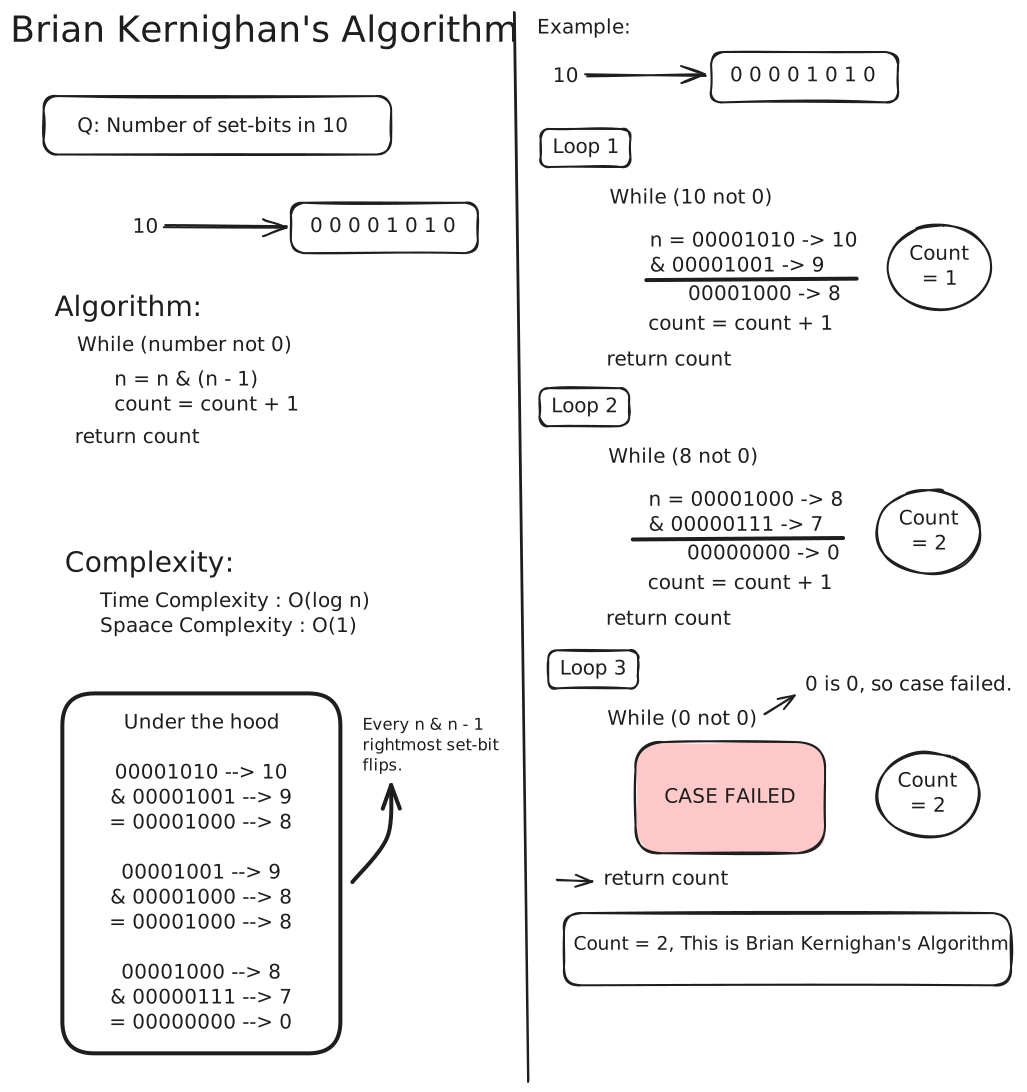
- See Brian Kernighan’s Algorithm
Goodbye Grogu,
Mrunal.